Tax Refund Calculator UK 2026/27
Compare tax already paid with an estimated 2026/27 annual Income Tax liability.Annual gross incomeIncome Tax already paidRegionEngland / Wales / Northern IrelandScotland
Calculate
Result—
Result—
Result—
Result—
For Tax Refund Calculator UK 2026/27, the calculation period is 6 April 2026 to 5 April 2027. The model concentrates on potential PAYE overpayment, with the key mechanics being tax paid compared with estimated liability. Treat the output as a transparent estimate rather than a replacement for HMRC or payroll records.
How to Use the Tax Refund Calculator UK 2026/27
A refund estimate needs both sides of the comparison: the tax deducted and the tax that appears to be due. Refund estimating is reconciliation rather than a new tax calculation. The tax already paid must be compared with an estimated correct liability under consistent assumptions.
The result can indicate a potential overpayment or underpayment. HMRC determines the final reconciliation and can include items not present in this simplified model.
2026/27 Personal Allowance
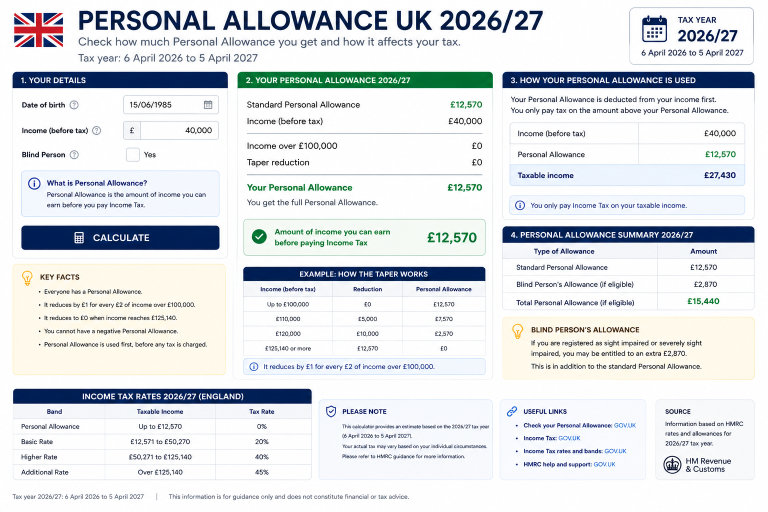
The £12,570 Personal Allowance is not guaranteed at every income level. For 2026/27 it starts reducing after £100,000 of adjusted net income at a one-for-two rate. By £125,140 the standard amount is nil, which is particularly important when modelling potential PAYE overpayment. The reason it appears on Tax Refund Calculator UK 2026/27 is page-specific: potential tax overpayment can be misunderstood if comparing tax paid against estimated liability is left implicit. The wording here is aimed at employees checking emergency or excess PAYE and the result should be read on that basis.
Income Tax Rates Used in the Model
The rest-of-UK side of Tax Refund Calculator UK 2026/27 follows the published 2026/27 PAYE bands: 20% basic, 40% higher and 45% additional. Because the bands apply to taxable income after allowances, the estimated refund moves with both the correct annual liability and the amount already paid; one number without the other cannot establish an overpayment. can shift the amount falling into each rate.
Where a regional comparison is useful for Tax Refund Calculator UK 2026/27, Scotland is treated as a distinct employment-income system rather than a minor adjustment. The estimated refund moves with both the correct annual liability and the amount already paid; one number without the other cannot establish an overpayment. Savings and dividend taxation are separate questions, so they are not folded into this salary comparison.
National Insurance and Other Deductions
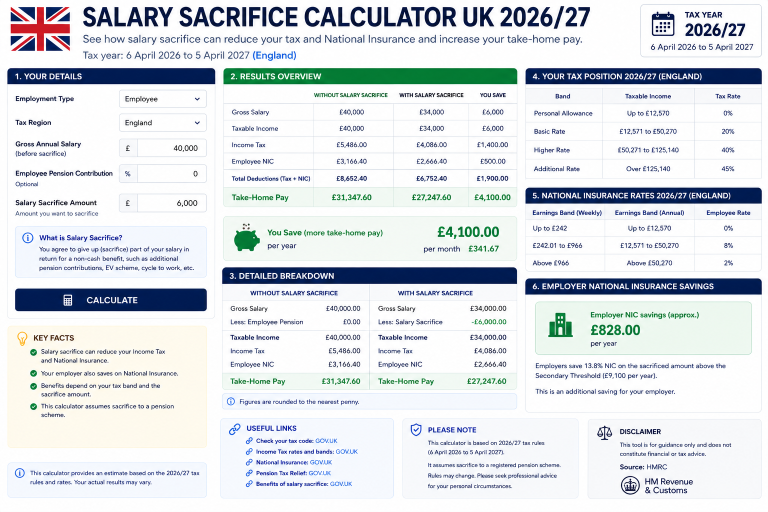
National Insurance is handled separately from potential PAYE overpayment. On salary pages that need it, the standard category-A planning model charges 8% above the annualised Primary Threshold to the Upper Earnings Limit and 2% above that. Pages that isolate dividends, CGT, allowance or pension relief do not invent an NI deduction. BritTaxCalc treats this differently on Tax Refund Calculator UK 2026/27 because the core output is potential tax overpayment. By focusing on comparing tax paid against estimated liability, the page avoids suggesting that the same rule has identical importance on every calculator.
Student loans can change cash take-home without changing the Income Tax liability. The 2026/27 model uses Plan 1 £26,900, Plan 2 £29,385, Plan 4 £33,795 and Plan 5 £25,000 at 9% above threshold, plus postgraduate £21,000 at 6%. On Tax Refund Calculator UK 2026/27, this point is included because the calculator is specifically about potential tax overpayment. The practical test is comparing tax paid against estimated liability; that keeps the explanation relevant to employees checking emergency or excess PAYE rather than turning it into a generic tax paragraph.
Who Should Use the Tax Refund Calculator UK 2026/27
This page is useful after a job change, emergency tax period or other situation where the employee suspects too much Income Tax was deducted.
The calculation centres on tax paid compared with estimated liability. The estimated refund moves with both the correct annual liability and the amount already paid; one number without the other cannot establish an overpayment. Keeping those drivers explicit makes it possible to rerun the same scenario after a pay rise, code change or new tax year without guessing which assumption moved.
Use the result to understand potential PAYE overpayment, then move to a specialist page if another income source or deduction becomes material. A page that tries to solve salary, dividends, capital gains, benefits, pensions and multiple jobs in one default calculation would hide more assumptions than it explains.
Worked Examples for Tax Refund Calculator UK 2026/27
- Example 1: enter £33,950 annual income and review the allowance, tax and any relevant payroll deduction separately. Changing only one input at a time makes it easier to see which threshold changes the result.
- Example 2: enter £40,950 annual income and review the allowance, tax and any relevant payroll deduction separately. Changing only one input at a time makes it easier to see which threshold changes the result.
- Example 3: enter £47,950 annual income and review the allowance, tax and any relevant payroll deduction separately. Changing only one input at a time makes it easier to see which threshold changes the result.
- Example 4: enter £54,950 annual income and review the allowance, tax and any relevant payroll deduction separately. Changing only one input at a time makes it easier to see which threshold changes the result.
- Example 5: enter £61,950 annual income and review the allowance, tax and any relevant payroll deduction separately. Changing only one input at a time makes it easier to see which threshold changes the result.
- Example 6: enter £68,950 annual income and review the allowance, tax and any relevant payroll deduction separately. Changing only one input at a time makes it easier to see which threshold changes the result.
- Example 7: enter £75,950 annual income and review the allowance, tax and any relevant payroll deduction separately. Changing only one input at a time makes it easier to see which threshold changes the result.
- Example 8: enter £82,950 annual income and review the allowance, tax and any relevant payroll deduction separately. Changing only one input at a time makes it easier to see which threshold changes the result.
Common Mistakes to Avoid
- Using 2025/26 thresholds on a page labelled 2026/27.
- Applying the highest marginal rate reached to the whole salary.
- Forgetting the Personal Allowance taper above £100,000 where it applies.
- Mixing Scottish employment-income rates with rest-of-UK bands.
- Treating National Insurance or student loans as if they were part of Income Tax.
- Assuming an annual estimate must equal every monthly PAYE deduction.
Related BritTaxCalc Calculators
Open the focused 2026/27 calculator.
Open the focused 2026/27 calculator.
Open the focused 2026/27 calculator.
Open the focused 2026/27 calculator.
Open the focused 2026/27 calculator.
Open the focused 2026/27 calculator.
Open the focused 2026/27 calculator.
Open the focused 2026/27 calculator.
Tax Refund Calculator UK 2026/27 FAQs
Is the result guaranteed to be refunded by HMRC?
No. It is a comparison estimate; HMRC can include other income, benefits or adjustments.What if the result shows an underpayment?
It means the estimated liability exceeds the tax entered as paid under the calculator assumptions.Which tax year is this calculator for?
The calculation is labelled for 6 April 2026 to 5 April 2027.Can actual payroll differ?
Yes. Pay frequency, cumulative PAYE, tax codes, benefits and other deductions can change a real payslip.